
Track Learning Progress and Upcoming Work
Check active courses, completion, streaks, certificates, and upcoming work from one learning dashboard.
In this guide2 sections and article resources
Article resources
Open My Learning in the community for a personal summary of your learning activity.
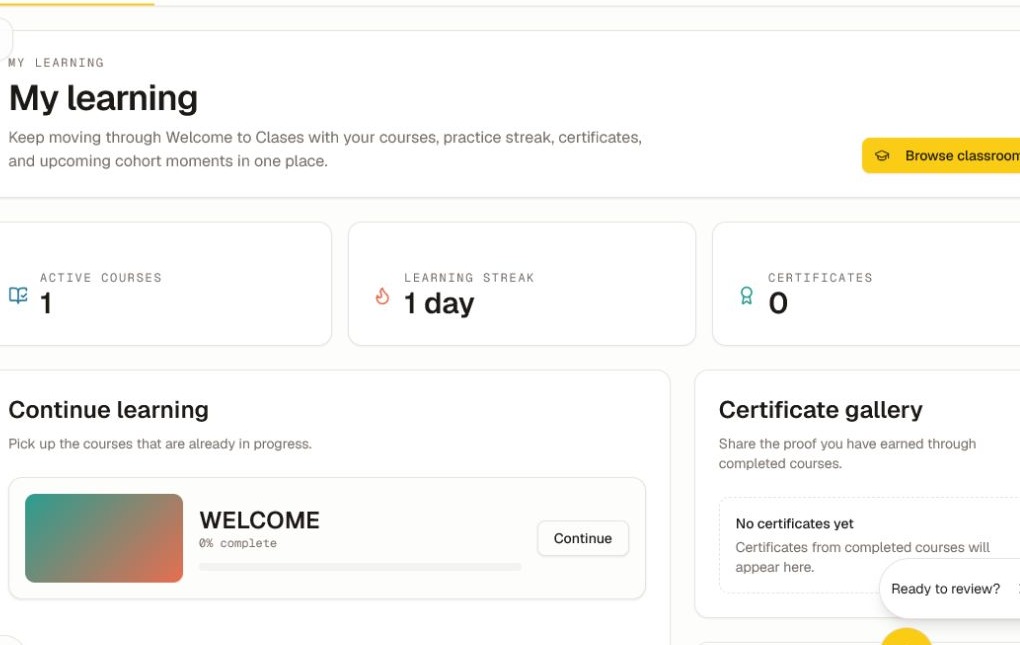
The dashboard can show:
- the number of active courses;
- your learning streak;
- earned-certificate count and Certificate gallery;
- Continue learning cards with course progress; and
- upcoming lessons, events, or cohort work.
Choose Continue on a course card to return to its next available learning item.
How progress is calculated
Progress updates only when the course's required action records successfully. That can include marking a lesson complete, submitting a quiz, meeting a passing score, completing every item, or satisfying a creator-defined rule.
Points and leaderboard activity are separate from course completion. A streak can change even when a course percentage does not.
If progress does not update
- Reopen the item and confirm that the lesson control shows completed or the quiz shows a submitted result.
- Finish any prerequisite, assignment, or required score.
- Refresh My Learning once.
- Reopen the course card and compare the outline with the dashboard percentage.
- If the result is still wrong, send the community admin the course, lesson or quiz, approximate completion time, time zone, and a privacy-safe screenshot.
Certificates appear only after every issuance rule is satisfied and the community has certificates enabled. See Earn, Download, and Share a Certificate.
Was this helpful?
Your response helps us improve this guide.