
Review and Control What AI Assistants Remember
Search your private AI memory, switch views and memory types, trace sources, request corrections, and understand tutor learning context.
In this guide2 sections and article resources
Article resources
Open Settings → Memory to review what supported AI assistants remember about you. This surface is private to your account.
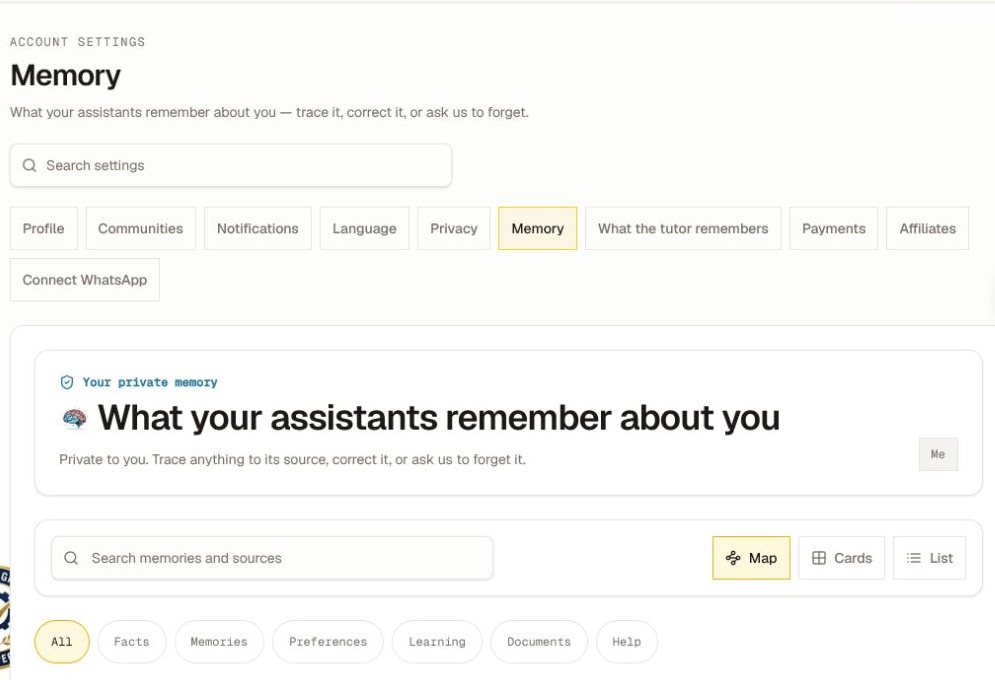
Find and inspect memory
- Search by a topic or source in Search memories and sources.
- Switch between Map, Cards, and List depending on how you want to browse.
- Filter by All, Facts, Memories, Preferences, Learning, Documents, or Help.
- Select an item to open Memory details.
- Review the source and use the offered correction or forget action when the item is inaccurate or no longer wanted.
The available actions depend on the memory type, source, and retention policy. A request to forget can require processing time and does not rewrite content that still exists in a course, message, document, or another system.
What the tutor remembers
Choose What the tutor remembers in Settings for the private learner-model view. It can summarize learning patterns or course context separately from the general Memory browser.
If that view says Learner model unavailable, the private learner-model panel cannot be loaded for the account at that time. It does not prove that every general memory is missing. Review Memory, refresh once, and try again later.
Never include private memory text in a public post or a support screenshot. When reporting a problem, share the memory type and visible error, not the remembered content itself.
Was this helpful?
Your response helps us improve this guide.