
Use Community Memory and Teach Cerebro
Inspect the knowledge used by community assistants, add reviewed sources, and apply governed memory actions safely.
In this guide5 sections and article resources
Article resources
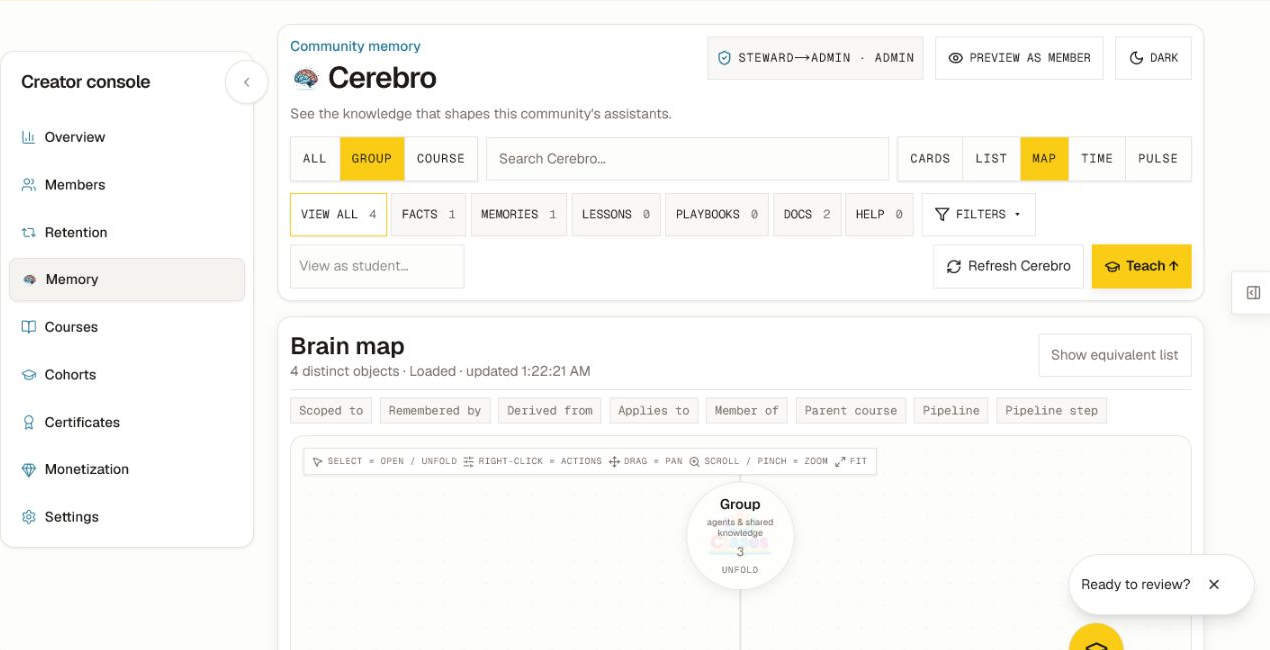
Open Creator console → Memory. This owner/admin workspace is called Cerebro. It shows the governed knowledge that can shape the community's assistants.
Understand the privacy boundary
- Group and Course lenses show shared knowledge your role may access.
- Your own personal memory can appear where policy permits.
- Another member's personal memory is never exposed here.
- Conversation/session memory and platform-level memory are excluded from this console.
- Preview as member changes the UI preview; it does not grant or reduce server permissions.
- View as student helps inspect the student-visible projection without making private records public.
Do not treat absence from the current map as proof that a record never existed. Filters, scope, indexing, expiry, and role policy can change what is visible.
Find the knowledge you need
- Choose All, Group, or Course.
- Search for a specific concept, source, or label.
- Narrow by Facts, Memories, Lessons, Playbooks, Docs, or Help.
- Choose Cards, List, Map, Time, or Pulse for the question you are answering.
- Select a map object or list item to open its details and source/relationship context.
The map is a projection of distinct visible objects. Use the equivalent list when precise labels and actions matter.
Teach Cerebro
- Choose Teach.
- Select the available input: approved file, pasted source text, or a concise assertion.
- Choose the correct destination, such as your personal scope, the group, a course, or an approved pipeline.
- Add a source label and enough context to review the claim later.
- Review the proposed scope, visibility, and conflicts.
- Submit the proposal and wait for the confirmed/indexed state.
Shared assertions can enter a review workflow instead of becoming authoritative immediately. Prefer primary source material, separate facts from instructions, and never upload secrets or another person's private data.
Apply governed actions
Depending on the object and your role, actions can include confirm, pin, edit, archive, renew, set/review expiry, request re-verification, promote, or resolve a conflict. Read the action dialog, target, scope, reason, and impact before confirming.
Owner tools such as Dump and Amnesia require extra care. Amnesia archives the visible memory projection while preserving source evidence and auditability; it is not a substitute for a legal deletion workflow. Export only to an approved secure destination.
Verify and troubleshoot
After teaching or changing an object, refresh Cerebro, reapply the same lens/filter, and test the relevant assistant as a member. If the map remains empty or partial, check the selected scope, knowledge type, indexing status, source processing, expiry, and access policy. Do not repeatedly upload the same source while the first job is still processing.
Was this helpful?
Your response helps us improve this guide.