
Manage Affiliate Referrals and Commissions
Review referral evidence, approve and pay commissions safely, reconcile failures, and end affiliate relationships without losing the audit trail.
In this guide4 sections and article resources
Article resources
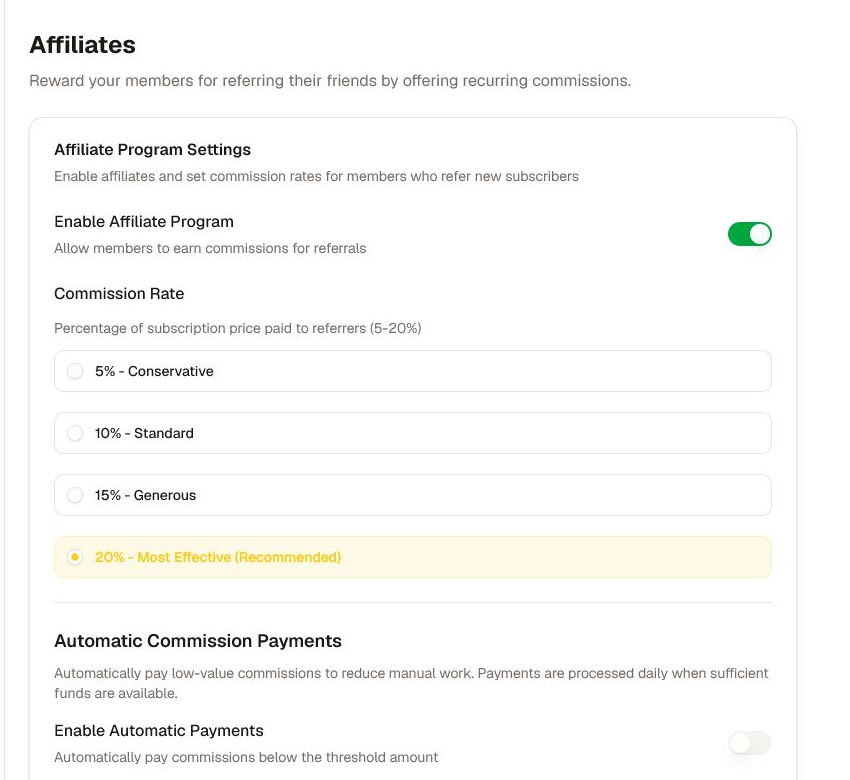
Configure the program policy before processing referrals. Open Creator console → Settings → Monetization → Affiliates to confirm enablement, commission rate, automatic-payment policy, eligibility, and the support/appeal process.
Use the operational dashboard
Open Affiliates for the selected community:
- Overview — referrals, commissions paid and owed, active affiliates, conversion, revenue, and period comparison.
- Referrals — referrer, referred member, referral/conversion dates, membership state, commission total, and status.
- Commissions — searchable/filterable commission records and the available approve, pay, cancel, bulk, preset, and export controls.
- Analytics — aggregate affiliate and conversion performance for the selected window.
- Affiliates — the active affiliate directory and relationship controls.
Names, email addresses, referral relationships, revenue, and payout states are private. Limit access and redact them from documentation, screenshots, and broad channels.
Review a referral and commission
- Confirm the community, affiliate, referred member, offer, attribution window, conversion record, currency, and amount.
- Verify the membership/payment state and applicable commission policy.
- Separate pending, approved, paid, and cancelled records; do not pay a pending or disputed commission.
- Record the reason and reviewer when approving or cancelling.
- Preserve the commission and provider identifiers needed for reconciliation.
A referral or conversion row is evidence to review, not permission to expose the parties or infer intent. Resolve duplicate, self-referral, refunded, disputed, or chargeback cases under the published policy.
Pay and reconcile safely
Pay one approved commission when possible before using a bulk action. Confirm the payout provider is ready, the amount/currency are correct, and sufficient funds are available. For Pay all approved or a bulk selection, review the exact count and total in the confirmation dialog.
After processing:
- compare the succeeded, warning, and failed counts;
- store provider transfer identifiers with the internal records;
- retry only a confirmed failed item, once;
- reconcile warnings before treating them as paid; and
- export the filtered evidence required by accounting.
Do not refresh, click Pay again, or start a second bulk run while the first result is pending. A timeout does not prove that no transfer occurred.
End an affiliate relationship
Confirm the affiliate, community, reason, effective date, outstanding approved commissions, active referrals, and communication plan before cancelling. Ending the relationship does not automatically reverse a completed payout, cancel a referred member's subscription, or delete records required for tax, accounting, fraud, or dispute handling.
If totals differ, align filters and dates with the course-sales and payment-provider reports. Escalate with redacted evidence and the referral, commission, transfer, and transaction identifiers.
Was this helpful?
Your response helps us improve this guide.