
Create and Manage Community Events
Schedule a live or in-person event with the correct time zone, access, meeting details, and reminders.
In this guide2 sections and article resources
Article resources
Open the community Calendar and choose Create Event. Only owners/admins with event permission should see authoring controls.
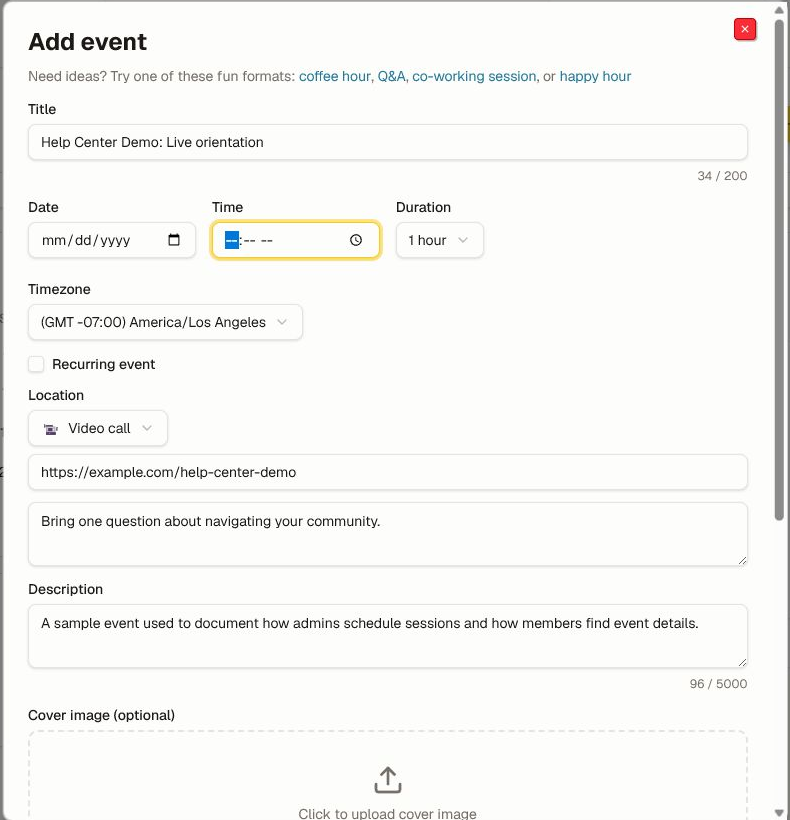
Schedule the event
- Add a task-oriented title, date, start time, duration, and event time zone.
- Turn on recurrence only when every occurrence follows the same rule. Check daylight-saving changes.
- Choose the location type. A virtual event needs an approved meeting URL; an in-person event needs enough location and accessibility detail.
- Add an agenda, preparation, expected outcome, host, and contact path.
- Add a licensed cover image and useful alternative text when it improves recognition.
- Review community access, capacity, registration, reminder, and replay expectations.
- Choose Add event.
Verify and operate
Open the saved event as a member and verify local time conversion, recurrence, access, join/location details, reminder, and add-to-calendar action. Test the meeting link in a private window without publishing a reusable host credential.
Edit or cancel from the event controls. Communicate material changes to registered members and update the external meeting/calendar record too. Do not put private attendee data, secret meeting controls, or an unrestricted recording link in the public description.
Was this helpful?
Your response helps us improve this guide.